Most mobile developers design applications assuming constant, high-speed 5G connectivity. They fetch data via REST or GraphQL directly in their UI state controllers, display a full-screen loading spinner, and render the view once the network responds.
If the user steps into an elevator, descends into a commercial basement to inspect an HVAC unit, or drives along a remote highway, the app crashes, hangs indefinitely, or throws ugly network error modals. For mission-critical field operations, an offline-first architecture is mandatory.
1. The Reality of Mobile: Network Is a Feature, Not a Guarantee
In an offline-first architecture, the network connection is treated as an optional enhancement rather than an essential dependency. The Flutter application must:
- Launch instantly from cold start even in airplane mode.
- Allow the user to create records, edit inspections, log hours, and capture signatures with zero latency.
- Store all operations in a durable local database (SQLite via Drift or Floor).
- Automatically detect network recovery and synchronize changes upstream in the background.
2. The "Local First, Remote Eventually" State Pattern
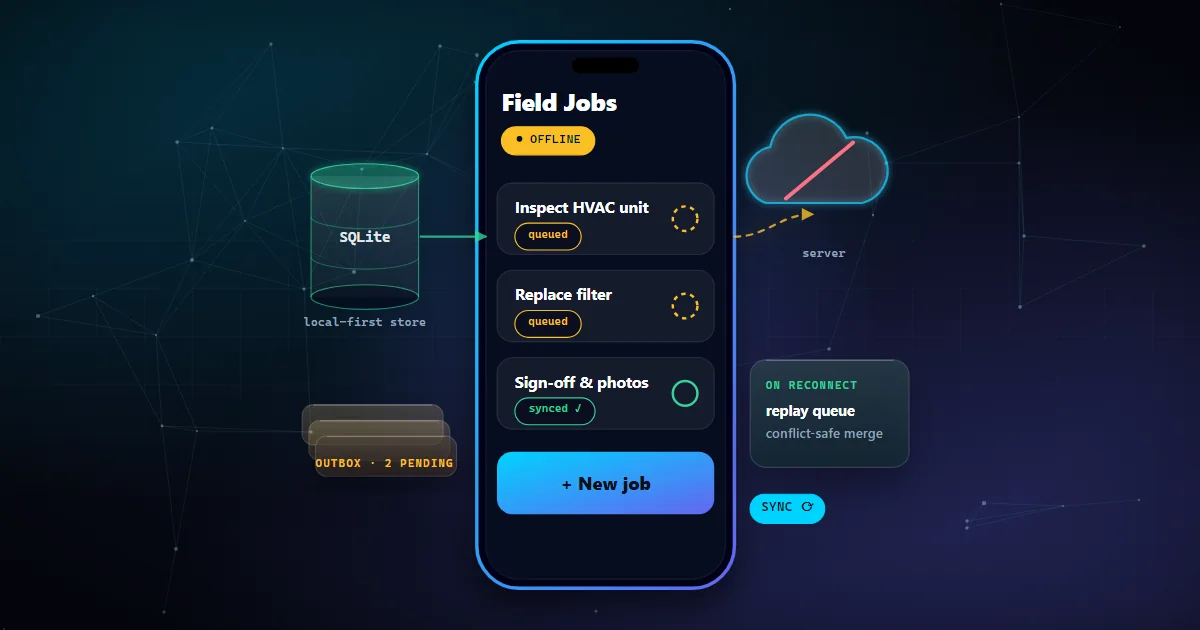
In offline-first Flutter, the UI never listens directly to HTTP network responses. The UI only listens to reactive streams emitted by the local SQLite database.
1. User taps "Save Inspection".
2. Repository writes immediately to local SQLite with
sync_status = 'pending'.3. Local reactive stream emits updated data → UI updates in 0 milliseconds.
4. Background sync worker detects the pending row → POSTs to cloud backend.
5. Cloud responds with 200 OK → Worker updates local row to
sync_status = 'synced'.
3. SQLite with Drift: Type-Safe Embedded Persistence in Flutter
We strongly recommend using Drift (formerly Moor) for Flutter projects. Drift generates compile-time type-safe Dart classes over native SQLite:
// Example Drift Table Definition in Flutter
import 'package:drift/drift.dart';

class Inspections extends Table {
  TextColumn get id => text()(); // Client-generated UUID v4
  TextColumn get jobId => text()();
  TextColumn get technicianNotes => text()();
  BoolColumn get isPassed => boolean().withDefault(const Constant(false))();
  TextColumn get syncStatus => text().withDefault(const Constant('pending'))();
  DateTimeColumn get clientUpdatedAt => dateTime()();

  @override
  Set get primaryKey => {id};
}
4. The Outbox Pattern: Asynchronous Sync Queues
Instead of attempting to POST to the remote API directly from the form submit button, write the operation to an outbox_mutations table in SQLite:
- Client-Generated UUIDs: Never rely on autoincrementing server IDs. By generating a standard UUID v4 on the device, the app can establish foreign-key relationships locally before ever talking to the server.
- Atomic Commits: Save both the inspection record and the outbox mutation entry inside a single SQLite transaction. If the app is killed by the OS immediately after saving, the queue remains perfectly consistent.
5. Handling Merge Conflicts Deterministically
What happens if the technician updates a job on their mobile device while an office dispatcher edits the same job in the web dashboard?
- Field-Level Merging: Avoid replacing entire JSON blobs. Merge changes at the specific column level (e.g., dispatcher updated
scheduled_time, technician updatedjob_notes). - Lamport Timestamps / Vector Clocks: Relying on wall-clock device time can fail if a technician's phone clock is set incorrectly. Monotonic sequence counters or server-authoritative timestamps resolve ties deterministically.
- Manual Conflict Queues: For financial transactions or contract status conflicts, flag the record for human review rather than silently overwriting data.