1. Understanding Zoho CRM API Rate Limits
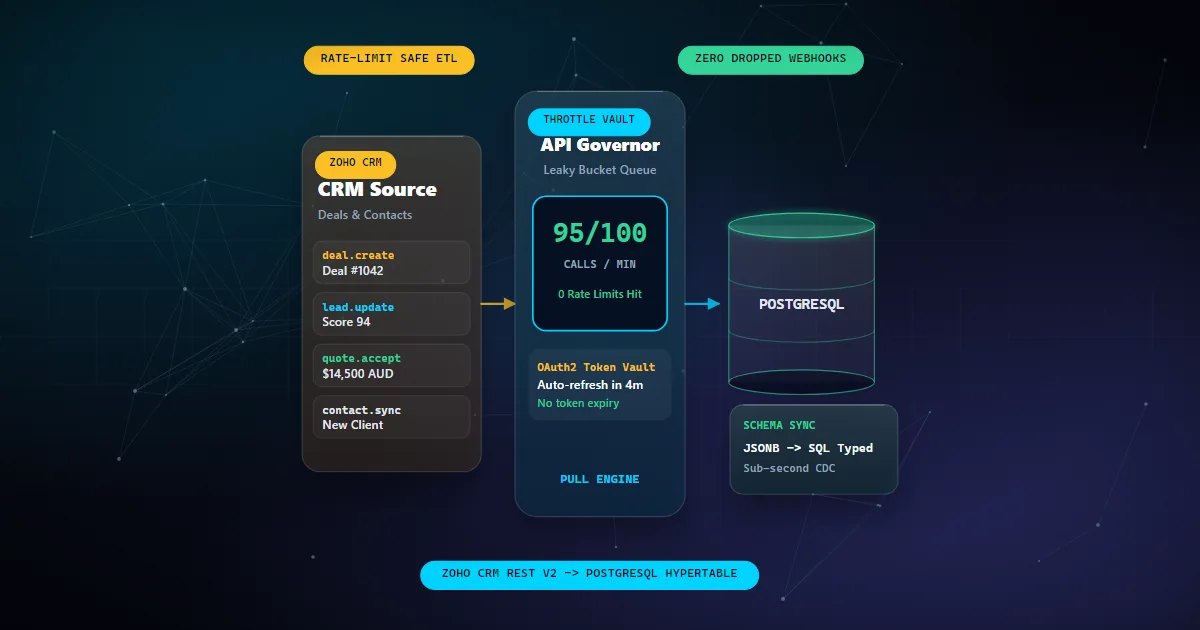
Zoho CRM imposes API rate limits to ensure fair usage and system stability. These limits can vary based on your subscription plan and intended usage, affecting how you design your data integration strategies.
2. Designing the Real-Time Data Pipeline
Creating a real-time data pipeline involves selecting the right tools and strategies to ensure continuous data flow while mitigating the impact of API rate limits. This includes choosing between batch processing and streaming data based on your business needs.
// Example of a simple data flow configuration
const pipelineConfig = {
  source: 'Zoho CRM',
  destination: 'PostgreSQL',
  batchSize: 100,
  pollInterval: 60000 // 60 seconds
};
3. Implementing n8n Workflow Automation
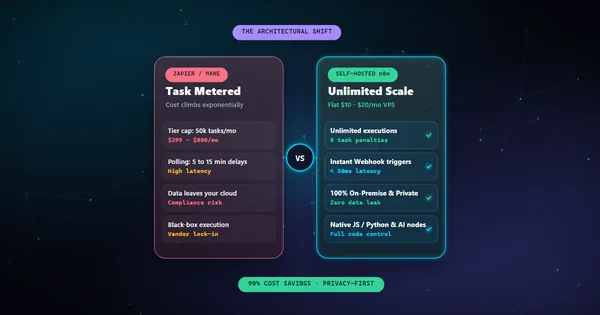
n8n is a powerful tool to automate workflows between different systems. By configuring n8n to handle Zoho CRM data exports, you can automate the extraction and loading processes, ensuring data is transferred efficiently and within API limits.
4. Enhancing Data Flow Efficiency
To maximize efficiency, implement strategies such as data caching, incremental data loading, and error handling. These techniques help in reducing unnecessary API calls and ensure data consistency.
5. Monitoring and Scaling the Pipeline
Continuous monitoring of the data pipeline is essential to adapt to changing data volumes and usage patterns. Implementing a scalable architecture allows your pipeline to grow alongside your data needs.
By following these guidelines, you can establish a robust, real-time data pipeline from Zoho CRM to PostgreSQL, overcoming API limitations and enhancing your data integration capabilities.